Enterprise Context Engine (Provisional)
Welcome to the Enterprise Context Engine (ECE).
What is the Enterprise Context Engine?
The Enterprise Context Engine (ECE) is the governed context layer for trustworthy AI. As content is ingested, it is extracted and chunked, and embeddings are created. Using ontologies, ECE extracts Global Entities and assembles them to form Business Objects. Using these constructs, ECE creates an evidence graph over enterprise content that captures entities, relationships, and provenance back to source documents.
While ingesting, the Cloud Content Repository and Knowledge Enrichment (KE) services work in unison to create this context layer. Together they represent the Enterprise Context Engine. Once the context layer is formed, it is housed within the Cloud Content Repository and is queryable through the APIs documented here. The platform combines:
- 🔍 Metadata Search - Find documents by their properties, ingest metadata, context enrichments, and Knowledge Graph (KG) processing states with HXQL.
- 🧠 Semantic and Hybrid Search - Search document chunks by vector similarity, optionally filtered by HXQL and chunk-text terms.
- 🕸️ Knowledge Graph - Build graph databases from ontologies, and then retrieve Business Objects, related objects, and provenance from them.
- 📎 Citations - Retrieve chunks with their page and bounding-box locations, and download the source files.
- 🔒 Access Control - Searches run with the end user's token, so document Access Control Lists (ACLs) filter every result to what that user may see. The graph APIs check the permissions granted to the caller's roles.
Key Features
Content Search
- Run HXQL queries over document properties, ingest properties (
cin_ingestProperties), and context enrichments (cinctx_contextProperties). - Run advanced queries with parameterised predicates and server-defined named queries.
- Use vector search over chunk embeddings, with hybrid filtering by HXQL and chunk-text terms.
- Search by per-value counts with terms aggregation and exact match counts with
totalCount.
Knowledge Graph Setup
- Create
v2graph databases with ACLs enforced. - Upload YAML ontologies and route them to content with condition expressions.
- Submit rebuild jobs to bootstrap or reprocess the graph, and track their status.
- Monitor per-document, per-ontology processing through
cinctx_kgProcessingStates.
Retrieval and References
- Stream original files (with range, conditional, and digest support) or get pre-signed URLs valid for up to 3600 seconds.
- Retrieve individual embeddings with the chunk text and its location in the source document.
- Leverage ECE Graph Query APIs to work with Business Objects, related Business Objects, shared attributes, and provenance.
Architecture Overview
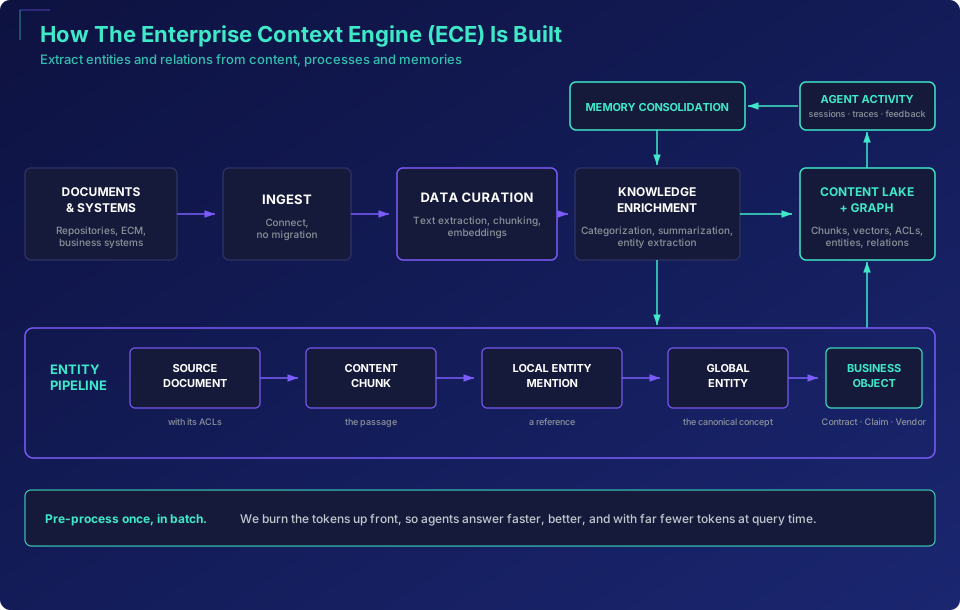
The following diagrams show how content flows through the system from ingestion to the queryable Knowledge Graph and how agents reach it.
How the Enterprise Context Engine is built
ECE extracts entities and relations from content, processes, and memories.
How agents reach the Enterprise Context Engine
Governed context for any agent — over MCP, or a CLI inside a code sandbox.

The Customer Journey
These APIs support every phase of working with the ECE, from initial content ingestion through to retrieval with citations.
1. Ingest Content
Content enters the system through CI Connectors (pre-built integrations for SharePoint, OnBase, file shares, or other content stores) or directly through the Ingestion APIs. The document lands in the Cloud Content Repository and is sent to Data Curation for processing: text extraction, normalization, chunking, optional PII redaction, and embedding generation. The curated chunks and embeddings are written back to the Cloud Content Repository.
At this point the document is searchable — you can run HXQL metadata queries, vector/semantic search, or hybrid search against the indexed content (see Querying with HXQL and Semantic and Hybrid Search for more information).
2. Set Up the Knowledge Graph
To extract structured knowledge from your content, you configure the graph infrastructure (see Setting Up the Knowledge Graph):
- Create a GraphDB —
POST /api/graph/graphdbscreates a graph database instance to house your knowledge graph. - Upload an Ontology —
POST /api/graph/ontologiesuploads a YAML ontology that defines the entity types, attributes, and relationships ECE should extract from your documents. - Create Ontology Routes —
PUT /api/graph/graphdbs/{graphDBId}/ontologyroutesmaps which ontologies apply to which content. Each route pairs anontologyIdwith aconditionexpression over document properties (for example, content type). - Build the Graph —
POST /api/v1/graph/rebuildsubmits a rebuild job for bootstrap or disaster recovery. The Cloud Content Repository scrolls the documents matched by your ontology routes (or by a custom HXQLquery), stamps their graph routing metadata, and sends them on for graph processing. ECE then processes them through the ontology, extracts Global Entities, assembles Business Objects, and populates the Knowledge Graph (see Rebuilding the Graph).
3. Query & Retrieve
Once the context layer is built, you have multiple ways to search and retrieve:
- Metadata Search —
POST /api/querywith HXQL to find documents by properties, context enrichments, ingest metadata, or KG processing states. - Hybrid Search —
POST /api/query/embeddingsfor vector/semantic search. Send a queryvector(required), optionally with an HXQLquerythat filters on the parent documents andchunkFTSterms to match in the chunk text. The vector must have the dimension of the environment's embedding model; for example, environments usingcohere.embed-multilingual-v3expect 1024 values, and any other length is rejected with a400error code. - Graph Data — retrieve Business Objects and group entities with aggregate queries (see Working with Graph Data).
- Graph Retrieval — the ECE Graph Query APIs search Business Objects by their shared attributes, find related Business Objects, explore shared attributes, and return provenance (citations back to the source document and location of each fact).
- Download References — retrieve the original document blobs or pre-signed URLs (valid for up to 3600 seconds), and get the chunks with their vectors for showing references in your application (see Downloading Content).
- Counts and Aggregations — HXQL has no
COUNT,SUM,GROUP BYorDISTINCT. Use thetotalCountreturned byPOST /api/query(withtrackTotalCountUpTo: -1for an exact number) to count matches, andPOST /api/query/termsAggregationto get approximate per-value counts (for example, how many documents have each enrichment type).
4. Ongoing Operations
The context layer is not static. As your content and domain understanding evolve:
- Add more graph databases for different domains or use cases.
- Revise ontologies — ontologies cannot be edited in place. Upload the revised YAML as a new ontology, and then point your ontology routes at it. An ontology can only be deleted once no route references it.
- Update ontology routes to change which content gets processed by which ontology.
- Rebuild the graph to reprocess content after ontology changes. Use
GET /api/v1/graph/rebuild/{jobId}to check the job's status. - Monitor processing states — query
cinctx_kgProcessingStatesvia HXQL to check per-document, per-ontology processing. Each entry has anontologyIdin the form<graphDBId>_<ontologyId>, astatusstring written by the KG pipeline (values seen includeSYNCEDandSYNC_FATAL_FAILURE), and astateblob holding the processing details.
When something is not working, the Error Reference maps each pipeline stage to what can go wrong and which API call tells you why. Start with SELECT * FROM SysContent WHERE sys_id = 'your-doc-id' to see everything about a specific document: its mixins, ingest properties, context enrichments, and KG processing states.
Use Cases
Retrieval-Augmented Generation with Citations
Find the passages that answer a question with vector search, ground the answer in sysembed_text, and highlight the citation using the chunk's page and bounding box.
Contract and Document Analytics
Filter documents by ingest properties (buyer, status, jurisdiction) and enrichment results (contract type, parties, dates), and break them down per value with terms aggregation.
Domain Knowledge Graphs
Define an ontology for your domain, route the relevant content to it, and build a graph of entities and relationships that agents can query.
Agent Context
Give Hyland agents, your own agents, and third-party MCP hosts governed access to the Cloud Content Repository and the Knowledge Graph, with entitlements enforced inside every query.
Quick Navigation
🚀 Getting Started
New to the Enterprise Context Engine? Set up your environment and make your first API calls.
🔐 Authentication
Obtain an OAuth 2.0 token, understand its claims, and check the permissions each API needs.
📚 Tutorials
Step-by-step guides for common workflows with tested examples.
📖 API Reference
Every endpoint with its parameters, request and response schemas, and status codes.
❌ Error Reference
Error formats, status codes, the real error messages per API, and how to fix them.
API Overview
All endpoints are served from your environment-specific base URL, https://{environment_id}.content-lake.ai.experience.hyland.com. The API Reference documents each operation.
| API group | What it covers | Base path | Operations |
|---|---|---|---|
| Query APIs | Use HXQL search, advanced predicates, vector/semantic search, terms aggregation, and indexing status. | /api/query | 5 |
| Download & Embeddings APIs | Download original documents, get pre-signed URLs, and retrieve individual embeddings for references. | /api/download, /api/documents/{docId}/embedding | 3 |
| GraphDB APIs | Create, list, get, and delete graph databases, and aggregate their entities. | /api/graph/graphdbs | 5 |
| Ontology APIs | Upload and manage ontologies, read the graph configuration, and set ontology routing rules. | /api/graph/ontologies, /api/graph/graphdbs/{graphDBId} | 6 |
| Graph Rebuild APIs | Submit graph rebuild jobs, and list or check rebuild jobs. | /api/v1/graph/rebuild | 3 |
| ECE Graph Query APIs | Search Business Objects, find related Business Objects, explore shared attributes, and get provenance citations. | /api/ece/business-objects | 5 |
Named queries, blob headers (HEAD), and the graph aggregate operation are covered with tested examples in the Tutorials.